The Hindu
Tamil Nadu SSLC Class 10 results declared: Here’s how to check marks
Tamil Nadu SSLC Class 10 results declared: Here’s how to check marks Students can choose one of several ways provided to download their marksheetsUpdated – May 20, 2026 04:21 pm IST The Hindu Bureau Students display the marks…
Tamil Nadu SSLC Class 10 results declared: Here’s how to check marks
Students can choose one of several ways provided to download their marksheets
Updated – May 20, 2026 04:21 pm IST

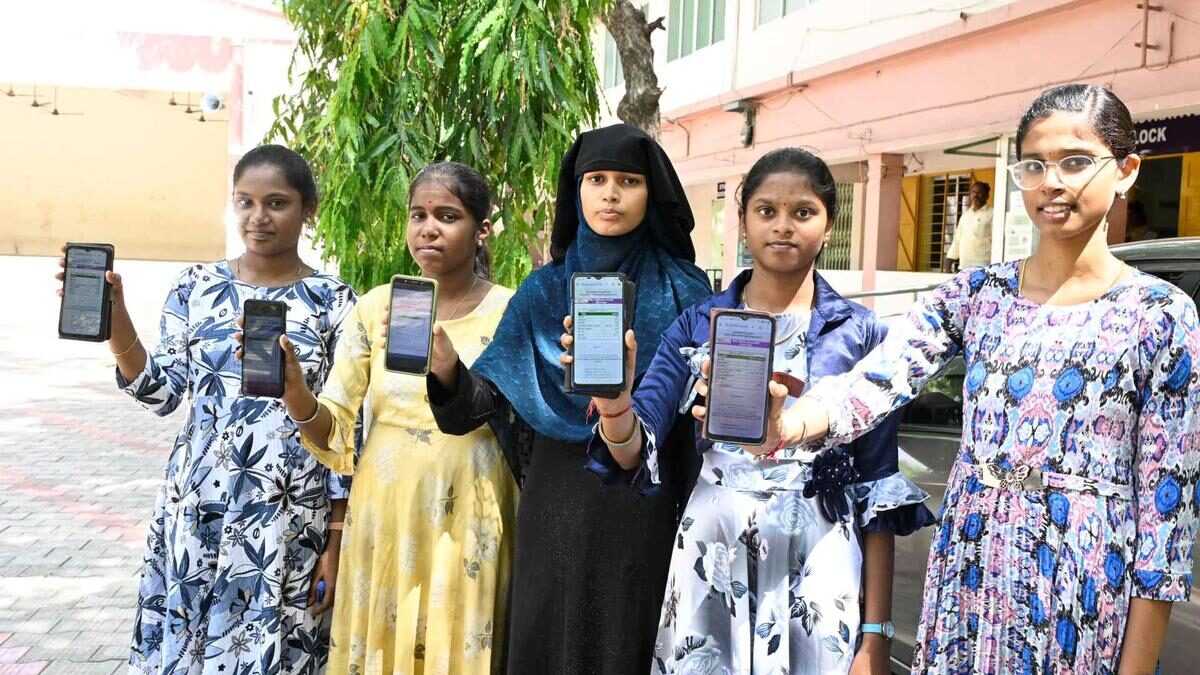
Students display the marks secured in Class 10 board examination on their mobile phones after results were declared in Erode in Tamil Nadu on May 20, 2026
| Photo Credit: M. Govarthan
The Tamil Nadu Secondary School Leaving Certificate (SSLC) grade/class 10 State Board examination results were released on Wednesday (May 20, 2026). The exams were held from March 11 to April 6.
Here is how you can check your results and download your marksheets:
Step 1: Visit the official results portal: tnresults.nic.in.
Step 2: Look for the link that reads TN SSLC Results 2026 on the homepage and click on it.
Step 3: A new login page will open. Enter your registration number/hall ticket number and your date of birth.
Step 4: Click on the ‘Submit and get results’ button.
Step 5: Your Tamil Nadu Class 10 result scorecard will be displayed on the screen.
Step 6: Download the page and print out of a copy of the provisional marksheet for immediate reference.
WhatsApp way to download results
A direct WhatsApp service has been launched to bypass heavy website traffic.
Here’s how you can download your marks through WhatsApp:
Step 1: Save the official number 7845252525 on your smartphone.
Step 2: Open WhatsApp and send a simple message saying ‘Hi’ to this number.
Step 3: From the automated options provided, select Directorate of Government Examinations and choose Class 10/SSLC.
Step 4: Enter your examination number and date of birth when prompted.
Step 5: Your detailed result will be shared with you instantly inside the chat window.
Published – May 20, 2026 09:47 am IST
Related Topics
Source & Attribution
This article was generated from an imported news source and rewritten for clarity and readability. View original source
[anap_related_posts]

 Prateek Tanmay